Overview#
pytme ships a set of command-line tools that cover the full template-matching workflow, from preparing templates to picking particles and analysing results. This page summarises what each command does and surfaces the choices most users need to make before running them. The practical examples walk through end-to-end use.
Commands at a glance#
pytme templatetemplate generation for matchingpytme matchexhaustive template matchingpytme postprocesspeak calling and analysis of matching resultspytme guinapari viewer for mask creation and result inspectionpytme batchsubmit matching and analysis jobs across many tomogramspytme utilsauxiliary tools
Each command exposes its full options via --help.
pytme match --help
pytme template#
pytme template generates templates for matching.
pytme match#
pytme match performs exhaustive template matching over a user-defined set
of rotations. Among its parameters, the scoring function defines how template
and target are compared, and the compute backend selects the hardware used for
the calculation.
Scoring functions#
Different scoring functions are optimised for specific mask geometries and
data conditions. Select one through --score.
Score |
Best for |
Mask type |
Speed |
Application |
|---|---|---|---|---|
|
Ribosomes, virus particles, globular proteins |
Spherical or elliptical |
Fast |
Particle picking |
|
Membrane proteins, filaments, asymmetric structures |
Cylindrical, tube, custom |
Medium |
Particle picking |
|
Quick screening |
None required |
Fast |
EM map fitting |
|
Edge-enhanced correlation, high S/N |
None required |
Fast |
EM map fitting |
|
General normalised CC |
Spherical or elliptical |
Fast |
Particle picking |
|
Partial volume matching |
Any (requires target mask) |
Slow |
EM map fitting |
Different scoring functions assume different mask types and data conditions.
Compute backends#
Depending on available hardware and use case, a different compute backend may be
preferable. Select one through --backend.
numpyfftw |
cupy |
pytorch |
jax |
|
|---|---|---|---|---|
Hardware |
CPU |
GPU (CUDA) |
CPU or GPU |
CPU, GPU, TPU |
Performance |
Fastest CPU |
Good GPU allrounder |
Best for peak calling |
Fastest GPU (aggregation) |
Analyzer support |
All |
All |
All |
MaxScoreOverRotations, MaxScoreOverRotationsConstrained, MaxScoreOverTranslations |
When to use |
CPU-only systems |
New users with an NVIDIA GPU |
Peak calling workflows |
Maximum performance |
pytme postprocess#
pytme postprocess analyses the score volume produced by pytme match.
It identifies local maxima (peak calling), applies score statistics and
background corrections, and emits results in formats suitable for downstream
software.
Peak calling strategies#
pytme supports several peak callers, each tailored to different score-map characteristics such as crowdedness, peak width, and edge artifacts.
Algorithm |
Best for |
Key features |
|---|---|---|
|
General use |
Fast, reliable local maxima detection |
|
Crowded environments |
Uses the template mask to restrict subsequent picks |
|
Well-separated broad peaks |
Robust, may miss overlapping peaks |
For most particle picking tasks you will want to use PeakCallerMaximumFilter or
PeakCallerRecursiveMasking.
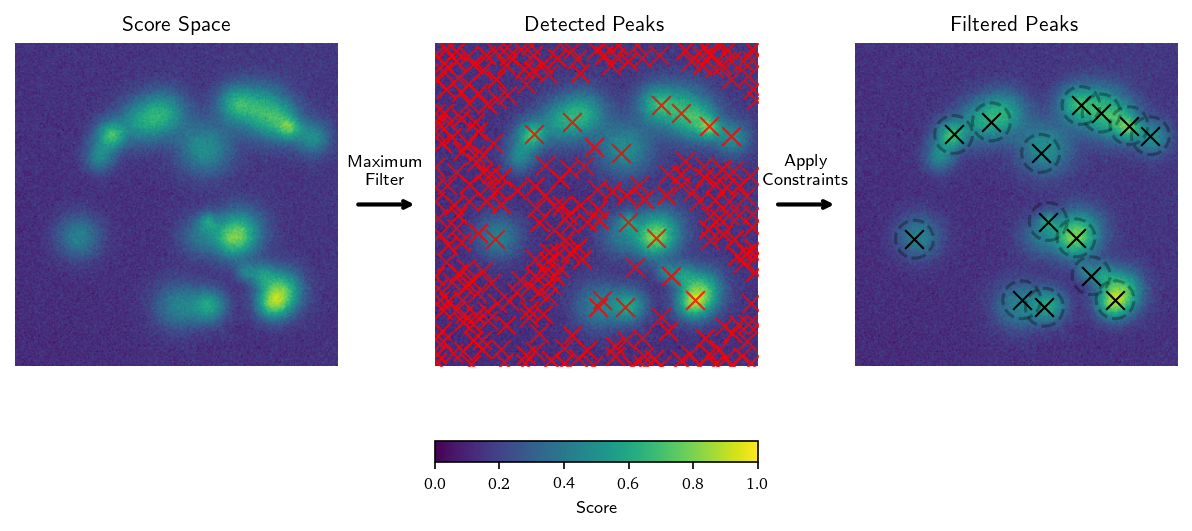
PeakCallerMaximumFilter generates candidate peaks by applying a
maximum filter to the score space. The filter size is set by the minimum
distance between peaks. Candidate peaks are those with the highest
score in their filtered neighborhood. Peaks are then filtered by
minimum distance, minimum boundary distance, and score bounds.
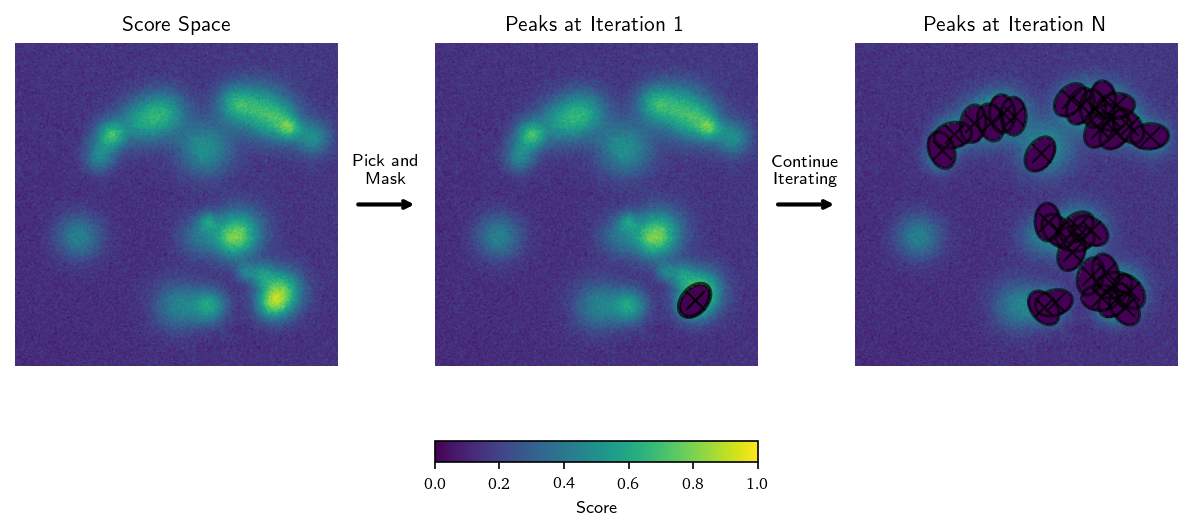
PeakCallerRecursiveMasking iteratively identifies the highest-scoring
peak in the score space and places a mask around it to avoid picking the
same region again. The mask can be user-specified and defaults to the
mask used for template matching. The identified rotation is applied to
the mask before placement. Particularly useful for environments like
viral envelopes.
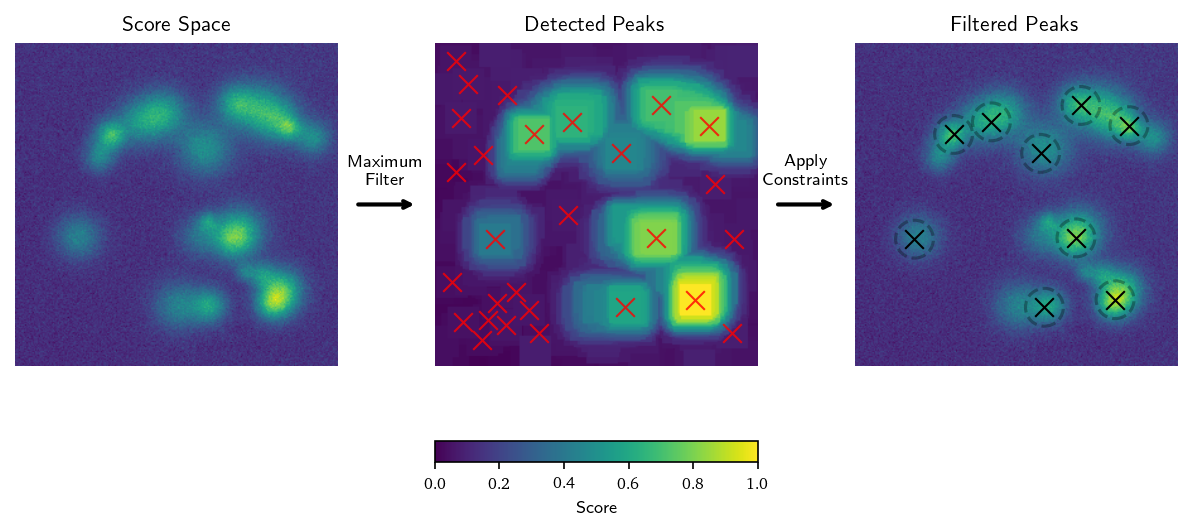
PeakCallerScipy operates like PeakCallerMaximumFilter but uses a
filter mask with twice the minimum distance. This makes it suitable for
cases where peaks are broad and well separated.
Several flags shape peak selection. --min-distance sets the minimum
separation between peaks in voxels. --mask-edges excludes tomogram
boundaries. --min-boundary-distance sets the minimum distance from
boundaries in voxels. --num-peaks caps the number of peaks returned.
Score cutoffs#
The number of peaks is usually unknown. --n-false-positives derives a
suitable cutoff from the statistical properties of the cross-correlation,
limiting the expected false-positive count [Rickgauer2017].
pytme postprocess \
    --input-file results.pickle \
    --n-false-positives 5 \
    --output-format orientations
Cutoffs can also be set explicitly with --min-score and --max-score.
The maximum number of peaks is always bounded by --num-peaks.
Background correction#
Cellular environments contain complex backgrounds that can yield high scores
in regions unrelated to the template. pytme can subtract such effects by
referencing template matching scores computed against alternative templates
(--background-file). Multiple background sources can be combined to
account for noise, membranes, and other contaminants. Multiple foreground
inputs let you distinguish between different macromolecular species in the
same run.
Added in version 0.3.0.
A single pytme postprocess invocation can combine all three features.
pytme postprocess \
    --input-file ribosome.pickle proteasome.pickle \
    --background-file noise.pickle membrane.pickle \
    --output-format orientations
The tool reports statistics for foreground, background, and normalised scores.
> Foreground mean 0.125, std 0.087, max 0.445
> Background mean 0.089, std 0.023, max 0.234
> Normalized mean 0.067, std 0.078, max 0.298
When background distributions differ between entities, --snr is useful for
comparing SNR-like cross-correlations across an entire dataset.
Output formats#
Pass --output-format to choose the format. See Coordinate System
for the coordinate convention used in all outputs.
orientations: tab-separated file with translations, ZYZ Euler angles, score, and peak details.relion4: STAR file with voxel coordinates (RELION 4 convention).relion5: STAR file with centered, voxel-scaled coordinates (RELION 5).alignment: subvolumes written with the template transformed into the identified orientation. Useful for visually assessing fit quality.extraction: subvolumes extracted around each peak, no rotation applied.average: a single averaged subvolume across all peaks.pickle: a new pickle incorporating input files and backgrounds, useful for assessing normalisation and reusable as--input-file.
pytme postprocess \
    --input-file output.pickle \
    --output-format orientations \
    --mask-edges \
    --min-boundary-distance 20 \
    --num-peaks 100
pytme gui#
pytme gui launches an interactive napari viewer for creating masks and for
visualising and analysing template matching results, including candidate
inspection.
See Using the GUI for a walkthrough.
pytme batch#
pytme batch automates template matching and analysis across many
tomograms. It has two modes that can be run independently or as a pipeline.
Added in version 0.3.1.
pytme batch matching: run template matching.pytme batch analysis: analyse template matching results.
See Cluster Execution for cluster submission, dataset discovery, and configuration.
pytme utils#
pytme utils collects auxiliary tools that support the main workflow. The
most commonly used are listed below.
pytme utils maskcreates simple geometric masks.pytme utils averageproduces a simple average from a set of picks.pytme utils evaluatecompares predicted picks against ground truth.pytme utils memoryestimates the memory required for a matching run.
Each subcommand exposes its options through --help.
References#
Rickgauer, J. P.; Grigorieff, N.; Denk, W. Single-protein detection in crowded molecular environments in cryo-EM images. eLife 2017, 6, e25648.